Tabs
Calibration Header

Critical Fields
1. Instrument ID: Instrument ID is a selection field where user can select Name and Search key of instruments which is in a Master data.
2. Instrument Name: This field represents the instrument's name in accordance with instrument ID.
3. Calibrated By: Calibrated By is a selection field where user can select details of which is a Master data.
4. Certificate Number: Certificate document number which is kept as a Hard copy.
5. Certificate Date: Certificate Document date which is kept as a Hard copy.
6. Last Calibration Date: Date of the most recent calibration.
7. Next Calibration Date: Date that the equipment will likely need to be calibrated again
Critical & one-time setup fields
1. Organization: This field is used to select the organization.
2. Target Document Type- This Field is used to select the type of document that you are going to process.
Non-Critical Fields
1. Description: To note Specifics required with documents and to describe other important information.
2. Serial Number: The serial number of Instrument subjected to calibration
3. Date Of Purchase: Date of purchase of Instrument which is to be calibrated
4. Least Count: Least count of instrument to be calibrated
5. Least Count UOM: Unit of measurement of least count
6. Frequency Of Calibration: How frequently instrument needs to be calibrated
7. Frequency Duration Unit: Daily, Weekly, monthly or Yearly Duration for calibration of instrument
8. Instrument Make: Instrument Make details entered by user manually.
9. Remarks: Any specifics and notes which is to be required with this document.
10. Range UOM: unit of measurement of range between instrument is to be calibrated
11. Range From: Minimum or initial range value from which instrument is to be calibrated
12. Range To: Maximum or last range value within instrument is to be calibrated.
Zoom Condition's
History
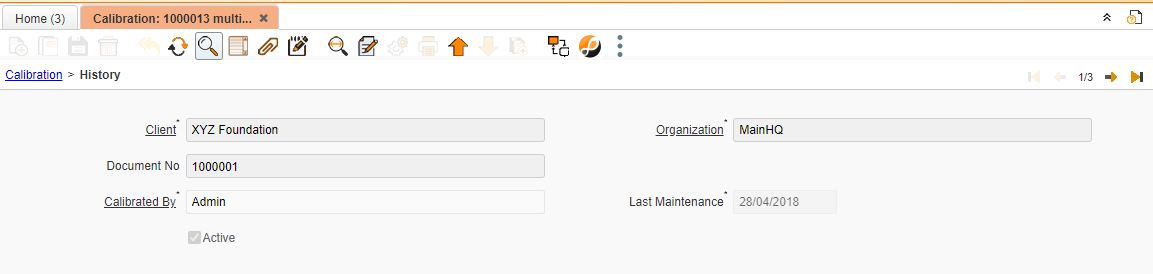
Once Header tab is saved. History tab is updated automatically with details calibrated by, Last maintenance Date.