Issue to Project
Introduction
Efficiently managing project resources is crucial for successful outcomes. Whether through material receipts or manual inventory allocations via expense reports, our system simplifies the process. Choose a project, specify materials, and seamlessly issue them, ensuring accurate tracking and timely execution. The default movement date is set for today's transactions, maintaining simplicity in material allocation for your projects.
Business process
In a construction company, the project manager needs to allocate materials for an ongoing project. The team has received a shipment of construction materials. To streamline the process, they utilize the company's inventory system. The project manager selects the project, enters the materials into the system either through a material receipt or an expense report with details like inventory location, product, and quantity. The default movement date is set to today's date, ensuring real-time accuracy. Once approved, the materials are officially issued to the project, updating inventory records instantly. This efficient process enables the team to maintain precise control over resource allocation and project expenses.
Process - Issue to project
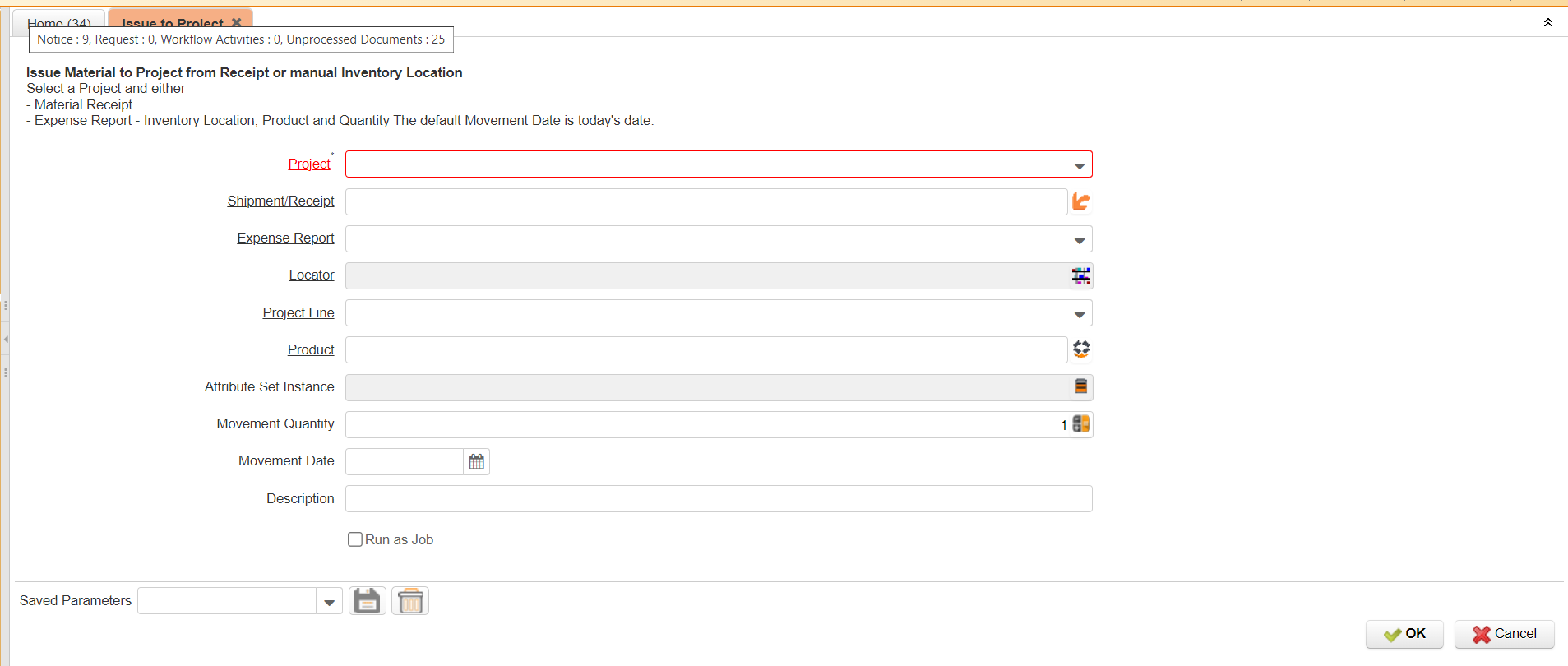
Project : User have to mention the project name here.
Shipment receipts : User have to mention the shipment/receipts in this field.
expense record: user have to mention the expense record
Locator: User have to mention the locator name
project line: user have to mention the project line
Product : user have to mention the product name here.
Attribute set instance: user have to mention the name here.
Movement quantity: User have to mention the quantity here.
Movement date: user have to mention the date here.
Description: user have to mention the description
while the user click on the "ok" button system will generate the transaction as per the above criteria