PR To Invoice Report
Introduction
Overview
This report is used to view the Purchase requisition to invoice tracking purpose
Business Case
In a manufacturing Industry management person want to see the total tracking detail from purchase requisition order to invoice.This report is used to track the details.
Execution


 Criteria
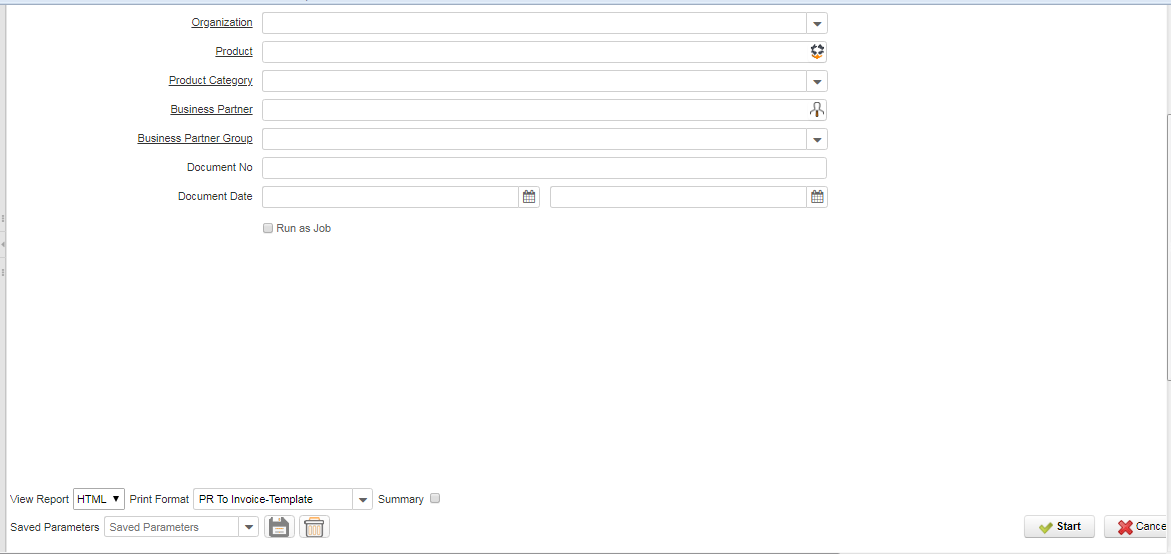
This report is used to view the Purchase requisition to invoice report tracking purpose
Selection fields
1) Organization- The user has to select the organization from where the data have to populate.
2)Product: Individual product selecting purpose, If the product is selected, the system product against the report displayed
3)Product category:
4) Business Partner- The user can select a business partner. Data will be displayed by the system based on the selected business partner.
5) Business Partner Group- The Business Partner Group provides a method of defining defaults to be used for individual Business Partners.
6) Document Number- The document number can be selected so that the data will be displayed for the selected document Number
7)Document date: This field is used to date-wise (From date and to date ) or for monthly-wise date filtering purposes.
Output fields
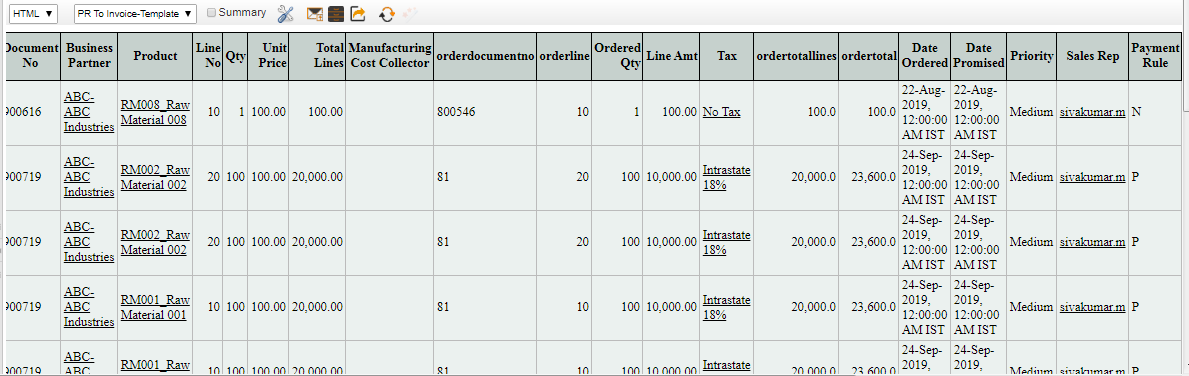
1) Document Number- The document number is usually automatically generated by the system and determined by the document type of the document. The system will display the requisition document number
2)Business Partner: The user can select a business partner.
Data will be displayed by the system based on the selected business partner.
3)Product: The product will be displayed by the system from the requisition document selected.
4)Line No- The line number is the serial number of the document.
5)Qty: Requisition quantity displayed by the system
6)Unit price: The system will display the requisition product unit price details
7)Total Lines: Line amount details displayed by the system (Quantity x Unit price)
8)Manufacturing Cost Collector
9)order document no: Purchase requisition against creating the purchase order document number displayed by the system
10)Orderline: The line number is the serial number of the document product
11)Ordered Qty: The system will display the Purchase order, order quantity details
12)Line Amt: Product price details displayed by the system
13)Tax: IF the Product against tax details is mapped, the System will display details
14)order total lines: Total amount without tax.
15)order total: The order Total displays the total amount including Tax
16)Date Ordered: The purchase order creation date will be displayed by the system
17)Date Promised: The purchase order commitment date will be displayed by the system
18)Priority: Purchase order Priority details
19)Sales Rep: Purchase order follow-up person details displayed by the system
20)Payment Rule
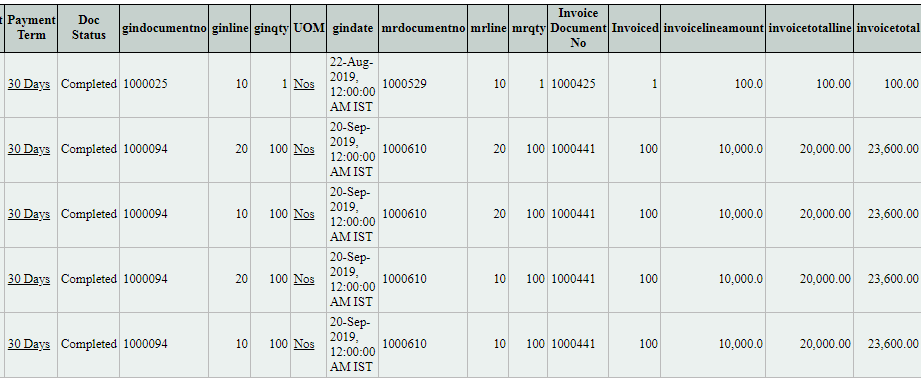
21)Payment Term
22)Doc Status: Purchase order Doc Status displayed by the system
23)gin document no: Goods inward details document displayed by the system
24)ginline : The line number is the serial number of the document.
25)ginqty : Product qty will be displayed by the system from the gin document selected.
26)UOM : Here system will display the Unit of measurement of the product
27)gindate Goods inward creation date displayed by the system
28)mrdocument no : If Gin against Material receipt document create, the system will populate the Material receipt document number
29)mrline : Line number is the serial number of the document
30)mrqty : Product qty will be displayed by the system from the gin document selected.
31)Invoice Document No: If an invoice is raised, the System will display the invoice document number
32)Invoiced :
33)invoice line amount: Total line amount displayed by the system
34)invoice total line: Total amount without tax detail
35)invoice total: Total amount within tax detail
 Criteria