Requisition
Introduction
Overview
A purchase requisition is an internal document that authorizes the Purchasing department to buy items or services. After a purchase requisition is approved, it can be used to generate a purchase order.
Business case
A purchase requisition is a request from an employee or department to buy goods or services. After internal review and approval it is used to create a purchase order that is sent to a supplier.
Business Needs of Requisition.
1. Creates a clear process for employees.
2. Makes purchasing more transparent.
3. Streamlines procurement.
4. Controls costs.
5. Deters or detects fraud.
6. Aligns with purchasing guidelines.
7. Prevents duplicate orders.
8. Increases accountability.
9. Provides documentation for financial audits.
Tabs
Requisition Header


Critical Fields
1. User/Contact: He is the contact person in that particular vendor side.
2. Date Required: Estimated delivery date of the product.
3. Warehouse: Product storage purpose, Select a warehouse where the final product is stored.
4. Price List: The price list will be selected in the product master once we select the product price list will display automatically and the user also select manually.
Critical & one-time setup field
1. Organization: This field is used to select the organization.
2. Document Type: This Field is used to select the type of document that you are going to process.
Non-Critical Fields
1. Manufacturing Order: This Field was utilized when we needed a requisition against a specific manufacturing order or when we wanted to generate a requisition with reference to a manufacturing order.
2. Description: Used to describe specifics about a requisition document or any other note, information, or data, for example.
3. Comment/Help: Used to describe specifics about a requisition document or any other note, information, or data, for example.
4. Priority: According to importance we can set priority for that Requisition (High, Low, Medium, Minor, Urgent).
5. Project: If this Requisition is processed against a project user can tag the project for tracking.
Zoom condition’s
1. MRP
Validation
1. Save: It will not allow to save document if Mandatory fields are missing.
Requisition Lines
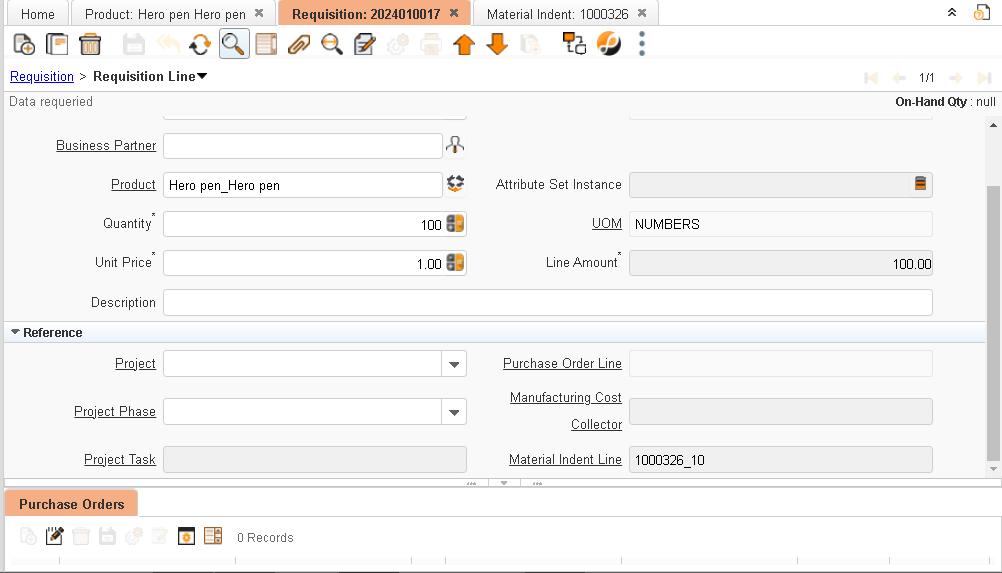
Critical Fields
1. Business Partner: We can select existing/new customers here and this field is used to maintain the Vendor.
2. Product: To select the product type an item, you can select the multiple products in this line item.
3. Quantity: Quantity that needs to be in purchased order.
4. Unit price:The Actual or Unit Price indicates the price for a product in the source currency.
Critical & one-time setup fields
Non-Critical Fields
1. Description: Used to describe specifics about a requisition document or any other note, information, or data, for example.
2. Project: If this Requisition is processed against a project user can tag the project for tracking.
3.Material indent line:its update automatically when indent against requisition created by using create lines from option we can choose material indent document number
Configuration:
Tool tip - It's helpful to display alternative products when purchasing the material.
Custom Column
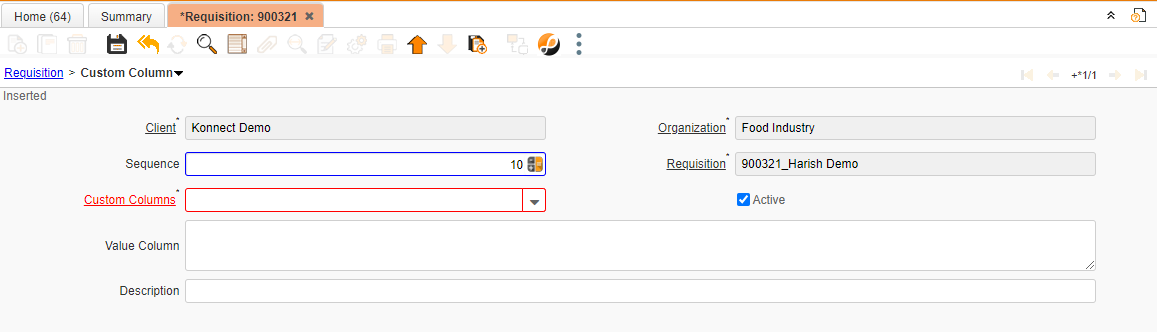
Critical Fields
1. Custom Column: User can set custom details required with document and it is a master data. once master is uploaded user can select that custom columns for requisition.
2.Value Column: To note Values of column Manually.
3. Description: To note Specifics required with documents and to describe other important information.
Document Actions
Validations
1. Save
System will check all mandatory fields.
2. Delete
System will delete the order and its historical details.
Actions
Document action prepare
1. System will check the period details and master data checking
2. If the payment schedule is not created, the system will automatically create a payment schedule based on the payment.
Document action complete
1. System will complete the document and keep the requisition ready for processing in the Purchase order.
2. Once document action is complete, all fields are updated in read-only.
Document action void/reverse correct actual
Void- system will reverse all the transaction data and change the document status to Void.
Document action close
The system will check whether all the activity for the document is completed and change the Document status to close.
Process
Requisition Process
Create lines from
To Create New Requisition Create lines form will help you to copy Material indent Details in Requisition.
Video
Requisition Video
Reports
Report is well Complied set of data according Scenario
| Sr.no | Report Name | Report Purpose |
| 1 | Requisition | This report Contains details of Requisitions According to Organization and Business Partner. |
| 2 | Purchase Requisition | This report includes details on Requisitions by Organization, Business Partner, & Product. |
| 3 | PR to Invoice Report | This report provides information on Product From Requisition to Invoice and illustrates how the request flowed through Purchase order, Material receipt, Shipment/Receipt, and Invoice. |
| 4 | Open requisition Report | Organization, Warehouse & Product wise open Requisition details Which are pending. |
Preceding and Succeeding Window
Requisition Connected Window
Preceding Window
Manufacturing Order :- Manufacturing Order
Production Queue :-Production Queue
Succeeding Window
Purchase Order :- Purchase Order
Create PO From Requisition (Manual) :- Create PO From Requisition (Manual)