SAC Codes
Introduction
- This window is used to maintain the Service Product Based SAC Codes.
Tab
Tab
SAC Codes
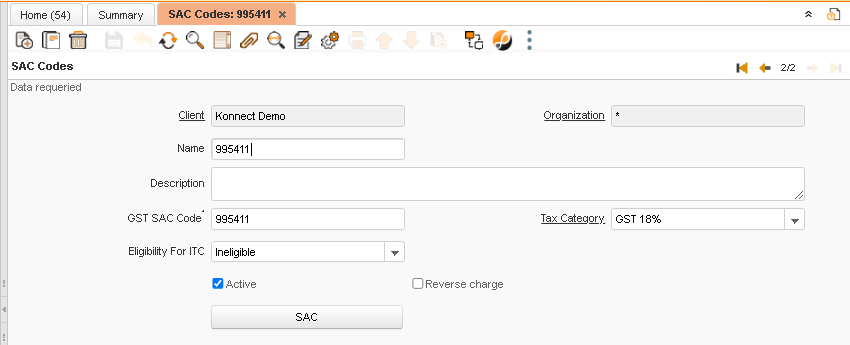
Critical Fields :
-
- Name : It is used to give SAC Code name
- GST SAC Code : Used to give a SAC code , It will be 6 digit as per the rules.
- Eligibility For ITC : Used to select the Eligibility like Capital Goods, Ineligible, Input, Input Services
- Tax Category : Used to select the Tax category for the HSN code
- Reverse Charge : Used to Maintain that the code is based on reverse charge or not
Non-Critical Fields :
- Description : Used to give any extra details about the Code
One Time Setup Critical Fields :
- Organization : Used to select the Organization for the code, In that particular organization only the Code will available.
Zoom Condition :
- Service Master
- Charge
- Product
Validation
Save :
- It is used to save the records after the mandatory fields are filled.
Delete :
- It is used to delete the records before the transaction are done.